
How to Export and Download Training and Deployment Logs
Did you get a request for all of your training records? Need to send your deployment logs to audit or accreditation? With Dogteampro you always have the ability to export your data.
- First, go to the "Training" or "Deployment" screen. From there you can filter based on time frame, K9 teams, and status.
- Select the logs you want to export by clicking the check boxes on the left of each log (click the checkbox on top to select them all).
- Once you've selected all of the logs you want to export, click on the "Export selected" button.

The download will begin automatically, but may take several minutes depending on the size and number of logs selected.

Export Single Logs from the Logs Screen
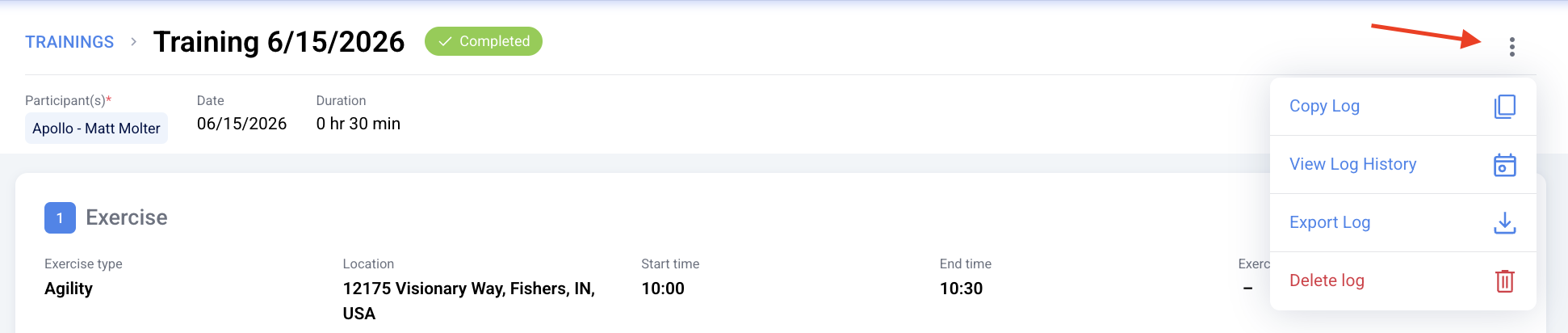
Handlers and supervisors can also export individual logs by opening the desired log and clicking on the "Export Log" option from the three dot menu on the upper right corner.
A pop up will ask you whether you want to include the log history or attachments. Make your selections and then click "download".
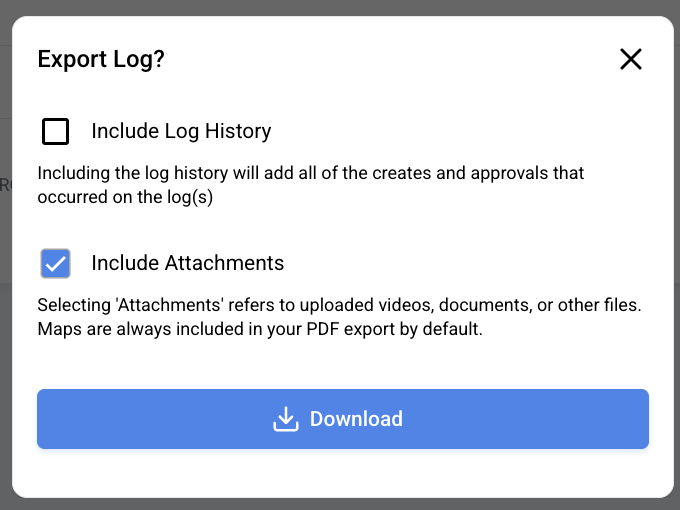
Note: Dogteampro will only embed maps into logs if the maps were created using the app's map feature. If a map is attached as a file, the system will zip and export it separately.